
Last week we saw the release of SQL Server 2019 CTP 2.5, with enhancements for Big data clusterrs and a Java language SDK for SQL Server. This is the 6th public release of the next version, and one that’s coming at an increasing rate. If you look at the cadence, there was a release in […] … Continue reading SQL Serve 2019 CTP 2.5
Author: Shadab Mohammad
Create C2 Native Auditing for SQL Server
Audit Trace Procedure _____________________ 1. Enable C2 Auditing from DB Options. 2. Restart SQL Server. 3. Check Location of Audit Logs in MSSQL folder in C:\ 4. Create AuditDB database with log and datafile in location D:\ 5. Create temp_trc table in AUDITDB database using below command : use auditdb SELECT IDENTITY(int, 1, 1) AS … Continue reading Create C2 Native Auditing for SQL Server
Install SQL Server 2019 on Docker
Shadabs-MacBook-Pro-2:~ shadab:~$ sudo docker pull mcr.microsoft.com/mssql/server:2019-CTP2.1-ubuntu 2019-CTP2.1-ubuntu: Pulling from mssql/server Status: Downloaded newer image for mcr.microsoft.com/mssql/server:2019-CTP2.1-ubuntu Check the new image: Shadabs-MacBook-Pro-2:~ shadab:~$ sudo docker images REPOSITORY TAG IMAGE ID CREATED SIZE mcr.microsoft.com/mssql/server 2019-CTP2.1-ubuntu 25b86ffb3a95 3 weeks ago 1.71GB Docker container: Shadabs-MacBook-Pro-2:~ shadab:~$ sudo docker run -e 'ACCEPT_EULA=Y' -e 'SA_PASSWORD=P@ssw0rd123$#' \ > -p 1433:1433 --name sqlserver19 … Continue reading Install SQL Server 2019 on Docker
Microsoft SQL Server Clustering – Advanced Interview Questions
A very good list of SQL Server Advanced Interview Questions on Clustering SQL interview questions & answers on SQL Server Failover Clusters - I https://www.sqlshack.com/sql-interview-questions-answers-on-sql-server-failover-clusters-i/ SQL interview questions & answers on SQL Server Failover Clusters – II https://www.sqlshack.com/sql-interview-questions-answers-on-sql-server-failover-clusters-ii/
Enable TDE (Transparent Data Encryption) for SQL Server 2016
Transparent Data Encryption is a encryption method for encrypting database files at rest. This method is native to the DB engine and is one of the most best methods to encrypt your data files to ensure performance doesn't take a hit. SQL Server and Oracle both support TDE natively on its database engine. Now let … Continue reading Enable TDE (Transparent Data Encryption) for SQL Server 2016
APEX Basic REST authentication
PowerUpSQL: A PowerShell Toolkit for Discovering SQL Server Vulnerabilties
PowerUpSQL is an amazing tool to audit your SQL Server instances. Not only does it do discovery of SQL Server on your AD but can also help identify common SQL Server vulnerabilities. It can be download from below 2 links https://github.com/NetSPI/PowerUpSQL https://www.powershellgallery.com/packages/PowerUpSQL/ For More information on how to user PowerUpSQL goto below link: https://blog.netspi.com/powerupsql-powershell-toolkit-attacking-sql-server/
Powershell – Part 4 – Arrays and For Loops

Arrays
For those that have never worked with arrays here’s a great way to understand them: If a variable is a piece of paper then the stack of papers is an array. It’s a list of variables or objects, and every programming/scripting language has ways to store these variables or objects linearly so you can access them later via a number of different methods.
So let’s look at how we can create an array of string objects in powershell:
$array = @("test1", "test2", "test3")$array
You can also add an element to the end of an array:
$array = @("test1", "test2", "test3")$array += "test4"$array
You can also add arrays together:
$array = @("test1", "test2", "test3")
$array2 = @("test4", "test5")
$array = $array + $array2
$array
You can access an element of an array if you know the index number of the element you want. Arrays are indexed by…
View original post 642 more words
Decrypting encrypted stored procedures, views, functions in SQL server 2005,2008 &R2

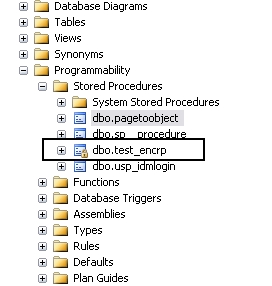
Any stored procedure or view or function can be encrypted when stored in the sql server , so a user can not see the code inside even if the user has SYSADMIN role and it is also not recommended to use this encryption option to hide the code because once you use the encryption option Microsoft sql server does not provide the option or the feature to reverse the setting or decrypt the object , so when you use the encryption option , save your code in a separate instance

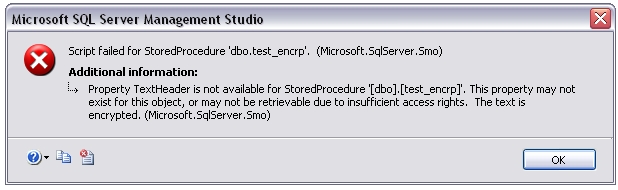
TITLE: Microsoft SQL Server Management Studio
——————————
Script failed for StoredProcedure ‘dbo.test_encrp’. (Microsoft.SqlServer.Smo)
For help, click: http://go.microsoft.com/fwlink?ProdName=Microsoft+SQL+Server&ProdVer=10.50.1750.9+((dac_inplace_upgrade).101209-1051+)&EvtSrc=Microsoft.SqlServer.Management.Smo.ExceptionTemplates.FailedOperationExceptionText&EvtID=Script+StoredProcedure&LinkId=20476
——————————
ADDITIONAL INFORMATION:
Property TextHeader is not available for StoredProcedure ‘[dbo].[test_encrp]’. This property may not exist for this object, or may not be retrievable due to insufficient access rights. The text is encrypted. (Microsoft.SqlServer.Smo)
For help, click: http://go.microsoft.com/fwlink?ProdName=Microsoft+SQL+Server&ProdVer=10.50.1750.9+((dac_inplace_upgrade).101209-1051+)&EvtSrc=Microsoft.SqlServer.Management.Smo.ExceptionTemplates.PropertyCannotBeRetrievedExceptionText&EvtID=TextHeader&LinkId=20476
First we will see how…
View original post 988 more words
Change MAXDOP (Maximum Degree of Parallelism) SQL Server
USE AdventureWorks; GO EXEC sp_configure 'show advanced options', 1; GO RECONFIGURE WITH OVERRIDE; GO EXEC sp_configure 'max degree of parallelism', 12; GO RECONFIGURE WITH OVERRIDE; GO
 SimpleSQLDBA | Shadab Mohammad